Toolport
Toolport 2.0 · free and open source (MIT)

Every MCP server, in every AI agent.Set up once. It just keeps working.

A free desktop app that connects your MCP servers to Claude Code, Codex, Cursor and 33 more agents. Add a server once and every agent has it.

Also Windows, macOS, Linux, native on Arch. Free, no account. Pro $5/mo syncs every machine. Team $19/mo shares it.

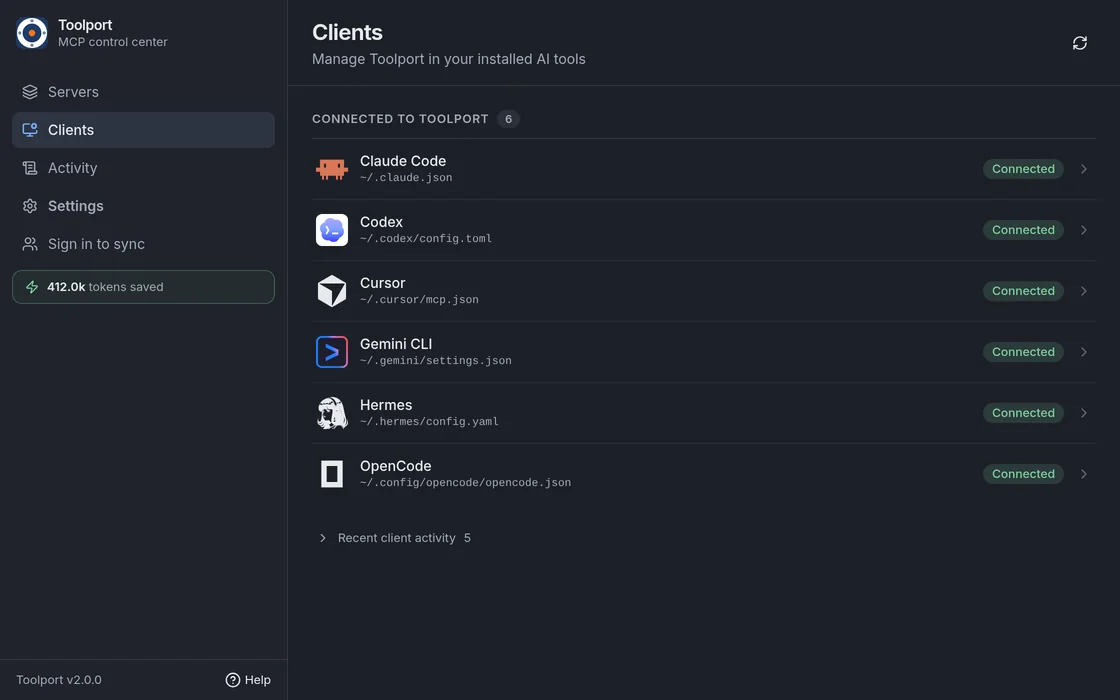
6 agents, one entry each. Keys in your OS keychain.

  • Claude Code1 entry ~/.claude.json
  • Codex1 entry ~/.codex/config.toml
  • Cursor1 entry ~/.cursor/mcp.json
  • Hermes1 entry ~/.hermes/config.yaml
  • Gemini CLI1 entry ~/.gemini/settings.json
  • OpenCode1 entry ~/.config/opencode/opencode.json
Toolport on your machine
  • Atlassian
  • Cloudflare
  • Linear
  • Stripe
  • Vercel
Works with Claude CodeClaude DesktopCursorCodexVS CodeGemini CLIZedClineOpenCode +27 more
The app

Your whole setup in one window.

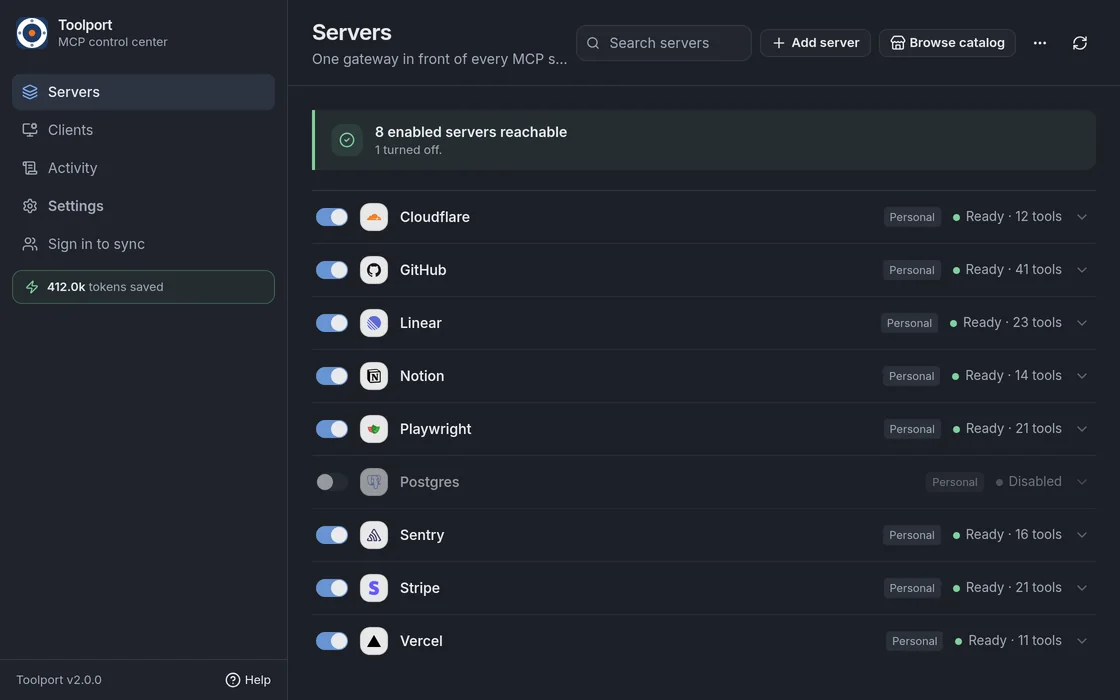
See every server and whether it is ready, which agents are connected, and what they called. Fix a server here and every agent gets the fix.

Toolport Servers screen: Cloudflare, GitHub, Linear, Notion, Playwright, Sentry, Stripe and Vercel, each Ready with its tool count
Every server in one list, with its status and tool count. Sample data.
How it works

Set up once, in four steps.

Toolport finds what you already have, moves it behind one gateway, and checks that every agent can reach it. Nothing to edit by hand.

  1. 1

    Find what you have

    Toolport detects the AI agents on your machine and lists the MCP servers already in their configs.

  2. 2

    Bring them in

    Import them in one go. API keys move out of plain-text config files and into your OS keychain.

  3. 3

    Connect each agent

    Each agent's direct server entries are replaced by one Toolport entry. A backup is kept, and you can restore it from the app.

  4. 4

    Check it works

    Toolport lists every server's tools through the gateway and shows which ones are ready.

 ~/.codex/config.tomlbefore
[mcp_servers.linear]
url = "https://mcp.linear.app/mcp"

[mcp_servers.stripe]
command = "npx"
env = { STRIPE_SECRET_KEY = "sk_live_..." }

[mcp_servers.cloudflare]
command = "npx"
env = { CLOUDFLARE_API_TOKEN = "..." }

# and again in Cursor, Claude Code, Zed...
 ~/.codex/config.tomlafter
# the only entry Toolport writes
[mcp_servers.toolport]
command = "/home/you/.config/Toolport/bin/toolport-gateway"

# 5 servers and 1,379 tools behind it.
# Keys live in your OS keychain.

Every agent gets that one entry. Your servers, keys and settings live in Toolport, so adding a server is one change, not one per agent.

After setup

It just keeps working.

MCP setups usually break quietly: a server times out, a token expires, a config edit goes wrong. Here is what Toolport does when that happens.

  • A server crashes or times out

    Retrying

    Retries it in the background, waiting a little longer each time, from 2 seconds up to 5 minutes. Your agents keep their one entry.

  • A sign-in expires

    Needs sign-in

    Stops retrying that server and asks you to sign in again, instead of hammering it with requests that will fail.

  • You add or remove a server

    Ready

    Toolport updates the shared server set immediately. Agents that support tool-list notifications refresh live; others need one reload.

  • You run six agents at once

    Ready

    Agents on this machine share one host gateway, so ordinary servers start once. Servers tied to a project folder start once for that folder.

  • You want your old setup back

    Restored

    Toolport backs up each agent's config before every edit. Disconnect restores what it moved.

Context

Tools load when a task needs them.

Many agents load every tool from every server before they start. Toolport gives agents a few small tools to search for and call the rest, so they load only what a task needs. Codex and Cursor get the full list by default.

81.5%fewer input tokens in Claude Code
1,707tools behind Toolport in the test
28/30tasks passed with search, 25/30 with the full list

Measured on 30 fixed test tasks in Claude Code with Haiku 5.5, against Claude Code's own tool search over the full list. Reported input tokens, including cache. Your numbers depend on your agent and servers. Method and raw numbers

Keys and safety

Your keys stay on your machine.

API keys live in your OS keychain, not in config files, and Toolport sends each key only to the server it belongs to. No account, no telemetry.

Toolport also fingerprints every tool a server offers and tells you when one changes after you approved it.

  • A tool's description changed after you approved itFlagged
  • A server added a new toolFlagged
  • Hidden Unicode in a tool descriptionFlagged
  • Injection patterns in a tool resultFlagged
  • A tool marked destructiveAsks you

These checks are heuristics. They catch common attacks; a determined attacker can still get past them. How the checks work

Plans

Free on one machine. $5 a month for all of them.

The desktop app is free and needs no account. Pro syncs your server list to every machine you use. Team shares one setup with up to 10 people for $19 a month, flat.

Free

$0 forever
No account, every machine you install it on

For you if you use one computer.

The whole app, on this machine.

  • Every agent on this machine, 36 supported
  • Keys in your OS keychain
  • Reconnects and tool checks
  • Each machine is set up on its own
Download No account. Open source (MIT).

Profor you

$5 a month
or $48 a year, $4 a month

For you if you use more than one computer.

One server list for every machine you use.

  • Sync the servers you choose to every machine
  • Connect a new machine and pull them in
  • Unlimited machines
  • Restore recent saved versions from the dashboard
  • Keys from 1Password, Doppler, Infisical or Vault
Try Pro free 14 days free. No card.

Teamflat price

$19 a month, whole team
up to 10 people, then $4 each · or $190 a year

For you if your team shares servers.

One shared setup for your team. Each person's keys stay on their own machine.

  • Everything in Pro, for everyone
  • Choose who can use which servers and tools
  • Roles, audit log and change review
  • Rate limits and signed webhooks
Try Team free 14 days free. No card.

Self-host $0 on your server

Run the Teams server on your infrastructure. Free up to 10 people, unlimited devices. Over 10 people, email for a license.

How to self-host
Try before you pay: one 14-day trial per account, Pro or Team, with no card. If it ends without a plan, the app keeps working on every machine and your account keeps one synced device.
Already on Free with a teammate? Teams created before these plans keep the free limits they signed up with.

Compare every feature and read the FAQ

Straight answers

What Toolport is, and what it isn't.

It is

  • A desktop app and a gateway that run on your machine
  • Open source under MIT. Read every line on GitHub
  • The desktop app needs no account. Sign in to sync it with Pro or share it with Team.

It isn't

  • A cloud proxy. Your tool calls do not go through our servers
  • A guard for calls an agent makes around Toolport
  • A substitute for checking what a server is allowed to do

Free on this machine. Pro puts it on every machine. Team gives it to everyone.